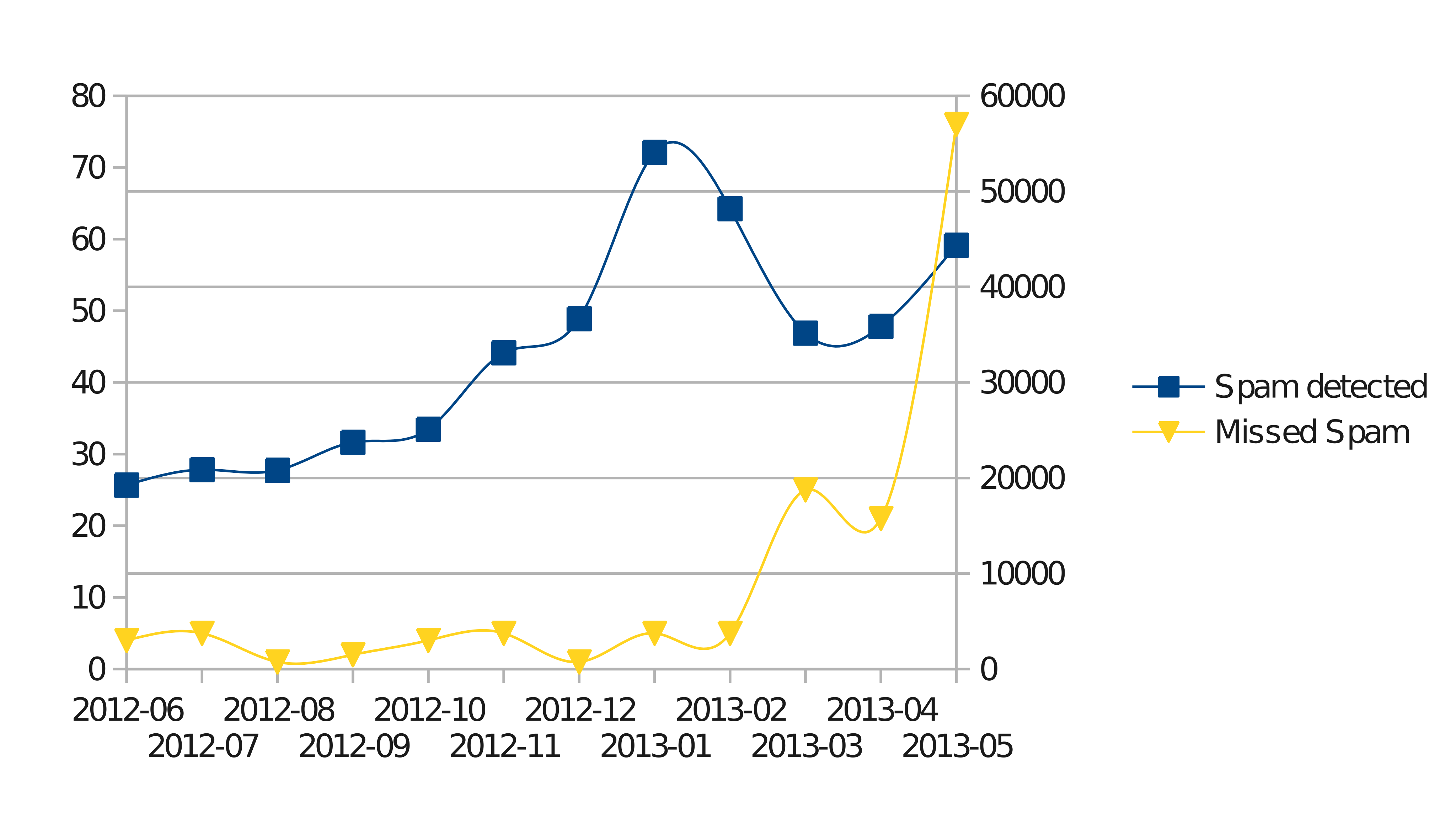
In the beginning of June, I wrote about the rising number of spam missed by Akismet. The main issue was a noticeable increase in the number of spam messages that get through Akismet, which is kind of the de-facto spam filter for WordPress. Twice a day, on average, I had to manually mark comments as spam, which really got under my skin. After writing that post, I looked at a number of solutions.
Continue reading Dealing with Spam – Follow-up
spass-3.1 Secure Password Generator Released
Usually, release announcements go together with the actual release. Somehow, I’ve postponed writing about the new release for quite some time, but better late than never.
spass is a tool that creates cryptographically strong passwords and passphrases by generating random bits from your sound card. It works by passing noise from the sound card through a Von Neumann process to remove bias and then uses MD5 to “distill” a truly random bit from every 4 bits of input.
The new version of spass, version 3.1, was released two months ago. The code should now compile easily on both Linux (ALSA, OSS, and PortAudio backends) and Windows (only PortAudio is supported). There are some minor tweaks to the CLI, but the main part is a new Qt interface, with screenshots of it available on the project’s SourceForge page. I’ve also migrated the build system to CMake (from automake), which should make it easier to build.
You can download the sources, 64-bit Debian package, and binaries for Windows from here. If you use spass and create binary packages for more platforms, that would be great.
BTW, as you can see, I’ve migrated the code to SourceForge from GitHub. I know it’s not a popular move, but their lack of binary downloads is really frustrating.
Securing Access to phpMyAdmin on Lighttpd via SSH
phpMyAdmin lets you easily manage your MySQL databases, and as such it also presents a security risk. Logging in to phpMyAdmin is done using a username and password for the database. Hence, if someone is able to either eavesdrop or guess them by brute force, they could wreak havoc on your server.
A possible solution to the eavesdropping problem is to use SSL to secure communication to phpMyAdmin. However, SSL certificates don’t provide any method to stop brute-forcing. To prevent brute-force attempts, you could limit access to your IP address. However, most of us don’t have static IPs at home. The solution I came up with kind of combines both approaches.
Instead of using SSL to encrypt the data sent, I’m using SSH, and instead of limiting access to my IP address, I’ll limit access to the server’s IP address. How will it work? First, we start by editing the phpMyAdmin configuration for lighttpd. This usually resides in /etc/lighttpd/conf-enabled/50-phpmyadmin.conf. At the top of the file you’ll find the following lines:
alias.url += (
        "/phpmyadmin" => "/usr/share/phpmyadmin",
)
These lines define the mapping to the phpMyAdmin installation; without them, phpMyAdmin wouldn’t be accessible. We use lighttpd’s conditional configuration to limit who is able to use that mapping by changing the above lines to:
$HTTP["remoteip"] == "85.25.120.32" {
        alias.url += (
                "/phpmyadmin" => "/usr/share/phpmyadmin",
        )
}
This limits access to phpMyAdmin only to clients whose IP is the server’s IP (of course you’ll need to change that IP to your server’s IP). This curtails any brute-force attempts, as only someone trying to access phpMyAdmin from the server itself will succeed.
But how can we “impersonate” the server’s IP when we connect from home? The easiest solution would be to use the SOCKS proxy provided by SSH.
ssh user@server.com -D 1080
This will set up a SOCKS proxy on port 1080 (locally) that will tunnel traffic through your server. The next step is to instruct your browser or OS to use that proxy (in Firefox it can be done via Preferences->Advanced->Network->Connection Settings; it can also be defined globally via Network Settings->Network Proxy under GNOME). This achieves both of our goals. We are now able to connect to the server while using its own IP, and our connection to the server is encrypted using SSH.
This method can be used to secure all kinds of sensitive applications. We could have achieved the same thing by using a VPN, but it’s more hassle to set up compared to SSH, which is available on any server.
Incremental WordPress Backups using Duply (Duplicity)
This post outlines how to create encrypted incremental backups for WordPress using duplicity and duply. The general method, as you will see, is pretty generic, and I’ve been using it successfully to back up Django sites and MediaWiki installations as well. You can use this method to make secure backups to almost any kind of service imaginable: ftp, sftp, Amazon S3, rsync, Rackspace Open Cloud, Ubuntu One, Google Drive, and whatever else you can think of (as long as the duplicity folks implemented it :-)). If you prefer a simpler solution, and don’t care about incremental or encrypted backups, see my Improved FTP Backup for WordPress or my WordPress Backup to Amazon S3 Script.
Continue reading Incremental WordPress Backups using Duply (Duplicity)
Manually Install SSL Certificate in Android Jelly Bean
Apparently it’s pretty easy, but there are some pitfalls. The first step is to export the certificate as a DER-encoded X.509 certificate. This can be done using Firefox (on a PC) by clicking the SSL lock icon in the address bar, then More Information -> View Certificate -> Details -> Export. The exported certificate needs to be saved in the root directory of the phone’s internal storage, with a *.cer extension (or *.crt). Other extensions will not work.
Afterward, on the phone, click on “Install from device storage” under Settings -> Security -> Credential Storage. If you did everything correctly in the previous step, it will display the certificate name and ask you to confirm its installation. If you’ve exported the certificate in the wrong format, given it the wrong extension, or placed it somewhere other than the root of the internal storage, it will display the following error:
No certificate file found in USB storage
If you see it, just make sure you are exporting the certificate correctly and saving it in the right place.
More details: Work with certificates (geared toward the Galaxy Nexus, but should apply to any Android 4.0 and above).
Updated Aug 2015: Fixed a broken link.
GitHub Stops Offering Binary Downloads
Only a few months ago, almost anyone would swear by GitHub and curse SourceForge. GitHub was (and probably still) the fastest-growing and by now the largest code repository, while SourceForge was the overthrown king. SourceForge looks like an archaic service despite some major facelifts, while GitHub is the cool kid on the block. Recently, GitHub showed us why SourceForge is still relevant for the open-source community.
Back in December, GitHub dropped support for downloading files from outside the code repository. They say that they believe code should be distributed directly from the git repository. This is probably fine for projects written in dynamic languages (such as python, ruby, javascript), where no binary distribution is expected. However, this seems to me like a blow to any GitHub-hosted C/C++ project. No one expects lay users to compile projects directly from source; it’s a hassle for most people except developers (and possibly Gentoo users :-)).
It might be a good idea on GitHub’s part, as they promote themselves as a developer collaboration tool, and also most of their projects are indeed in dynamic languages (see the top languages statistics). The GitHub team offers two solutions in their post: uploading files to Amazon S3 and switching to SourceForge, and I’ve read at least a few people recommending putting binary releases in the git repository (bad idea).
Overall, I think this move by GitHub just turned SourceForge into the best code repository (for compiled code) once again.
Vim: Creating .clang_complete using CMake
The clang_complete plugin for Vim offers superior code completion. If your project is anything but trivial, it will only do so if you provide a .clang_complete file with the right compilation arguments. The easy way to do so is by using the cc_args.py script that comes with it to record the options directly into the .clang_complete file. Usually, one does
make CXX='~/.vim/bin/cc_args.py clang++'
However, the makefile generated by CMake doesn’t support the CXX configuration.
The solution is to call CMake with the CXX environment variable set:
CXX="$HOME/.vim/bin/cc_args.py clang++" cmake ..
make
Note that this will create the .clang_complete file in the build directory (I’ve assumed an out-of-place build), so just copy the file over to Vim’s working directory so it can find it. You’ll need to re-run CMake again (without CXX) to disable re-creating the .clang_complete file each time.
While looking for this solution, I first tried solving it by setting the CMAKE_CXX_COMPILER variable in CMake. However, for some strange reason, it didn’t like it, saying that the compiler wasn’t found (it shuns command-line arguments given in the compiler command).
The more I use clang_complete, the more awesome I find it. It has its quirks, but nonetheless it’s much simpler and better than manually creating tag files for each library.
Updated 6/1/2014: When setting CXX, use $HOME instead of ~ (to fix issues with newer versions of CMake).
Using std::chrono::high_resolution_clock Example
5 years ago I’ve shown how to use clock_gettime to do basic high-resolution profiling. The approach there is very useful, but unfortunately, not cross-platform. It works only on POSIX-compliant systems (especially not Windows).
Luckily, the not-so-new C++11 provides, among other things, an interface to high-precision clocks in a portable way. It’s still not a perfect solution, as it only provides wall time (clock_gettime can give per-process and per-thread actual CPU time as well). However, it’s still nice.
#include <iostream>
#include <chrono>
using namespace std;

int main()
{
    cout << chrono::high_resolution_clock::period::den << endl;
    auto start_time = chrono::high_resolution_clock::now();
    int temp;
    for (int i = 0; i< 242000000; i++)
        temp+=temp;
    auto end_time = chrono::high_resolution_clock::now();
    cout << chrono::duration_cast<chrono::seconds>(end_time - start_time).count() << ":";
    cout << chrono::duration_cast<chrono::microseconds>(end_time - start_time).count() << ":";
    return 0;
}
I’ll explain the code a bit. chrono is the new header file that provides various time- and clock-related functionality in the new standard library. high_resolution_clock should be, according to the standard, the clock with the highest precision.
cout << chrono::high_resolution_clock::period::den << endl;
Note that there isn’t a guarantee of how many ticks per second it has, only that it’s the highest available. Hence, the first thing we do is get the precision by printing how many times a second the clock ticks. My system provides 1000000 ticks per second, which is microsecond precision.
Getting the current time using now() is self-explanatory. The possibly tricky part is
cout << chrono::duration_cast<chrono::seconds>(end_time - start_time).count() << ":";
(end_time - start_time) is a duration (a newly defined type), and the count() method returns the number of ticks it represents. As we said, the number of ticks per second may change from system to system, so in order to get the number of seconds we use duration_cast. The same goes for microseconds in the next line.
The standard also provides other useful time units, such as nanoseconds, milliseconds, minutes, and even hours.
Installing Citrix Receiver on Ubuntu 64-bit
It’s a hassle.
The first step is to grab the 64-bit deb package from the Citrix website. Next, install it using dpkg:
~$ sudo dpkg --install Downloads/icaclient_12.1.0_amd64.debThis results in the following error:
dpkg: error processing icaclient (--install):
 subprocess installed post-installation script returned error exit status 2
Errors were encountered while processing:
 icaclient
This can be fixed by changing line 2648 in /var/lib/dpkg/info/icaclient.postinst:
echo $Arch|grep "i[0-9]86" >/dev/nullto:
echo $Arch|grep -E "i[0-9]86|x86_64" >/dev/nullAnd then execute:
~$ sudo dpkg --configure icaclientCredit for this part goes to Alan Burton-Woods.
Next, when trying to actually use Citrix Receiver to launch any apps, I encountered the following error:
Contact your help desk with the following information:
You have not chosen to trust "AddTrust External CA Root", the
issuer of the server's security certificate (SSL error 61)

In my case, the missing root certificate was Comodo’s AddTrust External CA Root. Depending on the certificate used by the server you’re trying to connect to, you may be missing some other root certificate. Now, you can either download the certificate from Comodo, or use the one in /usr/share/ca-certificates/mozilla/AddTrust_External_Root.crt (they are the same). Either way, you should copy the certificate to the icaclient certificate directory:
$ sudo mv /usr/share/ca-certificates/mozilla/AddTrust_External_Root.crt /opt/Citrix/ICAClient/keystore/cacerts/
These steps got Citrix working for me, but your mileage may vary.